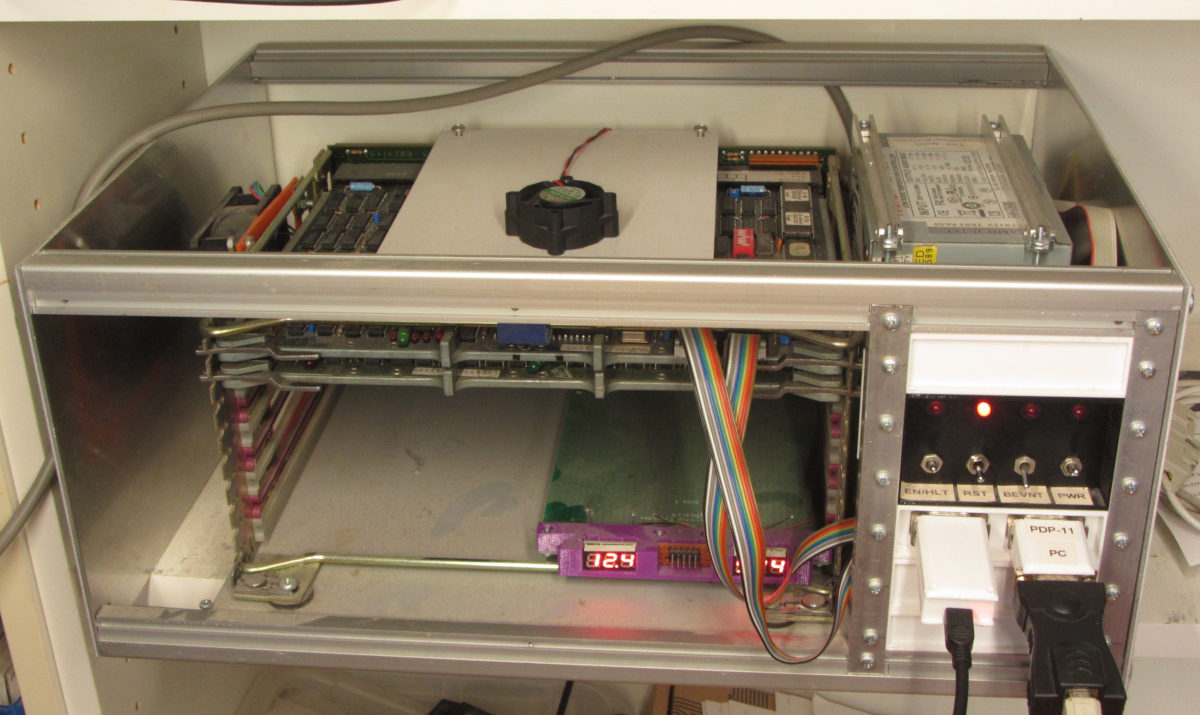
There are lots of ways to program in a PDP-11 environment, from completely native to completely emulated. I prefer the comfort of a modern graphic editor with syntax-highlighting, but also the real hardware. The goal is to write and use assembly programs in an OS-environment for educational and demonstration purposes. I prefer to avoid any A.I. produced code as it doesn't add much to my knowledge.
Building in a native environment is authentic, but slow, certainly if you ise a 9600 BAUD TU58 server as mass media device. But it is probably comparable with a floppy drive system.
The setup I have now is a working tool-chain, and produces working RT-11 programs. A good time to document it, before improvements break it :-).
Eventually, I want to do most of the building work using Linux, but it doesn't work yet. I am lucky that a more native approach does work.
The real hardware is currently:
More images at the main page.
The current setup runs tu58fs with one shared directory containing an 'RT-11SJ V05.03' system.
This describes a working tool-chain. Only file editing is non-native. MACRO-11 and LINK run in RT-11SJ V05.03. The TU58 is emulated.
Start tu58fs with a tu58image containing MACRO-11 and LINK, like:
tu58fs -p /dev/ttyUSB1 -b 9600 -rt -sd 1 w test2.dir -s 10M -d 0 w rt11v53.oversized.tu58
Enter this program as test2.mac:
                .MCALL .EXIT,.PRINT
                        .ENABL LC

                START:  .PRINT #MESSG     ;Print message...
                .EXIT ;then exit

        MESSG:  .ASCIZ "Test3 test text."

        .END    START
Copy test2.mac to the tu58fs shared directory:
cp test2.mac ../tu58_images/test2.dir/TEST2.MAC
Boot the PDP-11 via the TU58 interface
Type:
MACRO DD1:TEST2.MAC
This results in a TEST2.OBJ in DD0:.
        LINK
        Files? TEST2.OBJ
This results in a TEST2.SAV in DD0: which prints the message and returns to the RT-11 prompt. This is a working setup.
At this thread at vcfed.org hanshuebner suggested his rt11-macro configuration, which uses the simh-pdp-11 emulator running RT-11. This is a neat in-between alternative to the mostly native solution described above and the cross-assembly solution below
As I use Linux as my main system, this is a nice fit. Following the installation (mostly) resulted in a working tool chain.
Here the (simplified) script I use to start an assembly:
        FILE=$1
        MACROEXE=/home/fjkraan/kryten/site/comp/pdpNetBoot_sources/rt11-macro.git/rt11-macro

        export RT11_MACRO_MODE=native
        export PATH=../simh-pdp11/BIN/:$PATH

        $MACROEXE $FILE --sav
Using the assembly program listed above, this resulted in a working program. It is identical to the one produced with the real hardware. Unsurprising as it is almost the same code, with maybe a version difference.
So far there are these components which seem to work:
The system boots RT-11 from the TU58 interface, and files from the shared directory are visible and executable. However, the latest attempts drop to the ODT prompt.
This is the (simplified) shell script to run the assembler and linker:
	FILE=$1
	BASE=${FILE%%.*}

	macro11 $FILE -l $BASE.lst -o $BASE.obj -rt11  -m SYSMAC.SML

	perl obj2bin.pl --verbose --binary --rt11 --out $BASE.SAV $BASE.obj
Downloading and executing results in an ODT prompt or an other incomprehensible error message, so there is an issue somewhere. I'll hope to update soon.
Remarks:
Latest update: 2026-11-12